はじめに
くどうです。
以下は超メモです。
AWSでSysprepは何回できる(猶予期限リセット可能回数)か確認してみました。
確認方法
slmgr -dlv
対象
①Windows_Server-2012-R2_RTM-Japanese-64Bit-Base-2015.01.14 (ami-4c584b4d)
②Windows_Server-2008-R2_SP1-Japanese-64Bit-Base-2015.01.14 (ami-3c594a3d)
①Windows Server 2012R2
もともと、猶予期限リセット可能回数が1000に増えていることもありほぼ無制限。
その為、気にすることはない。これは、どんなクラウド、オンプレでも同じです。
実際のAWS環境では989→988に減りました。

②Windows Server 2008R2SP1
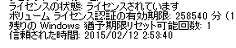
なんと、インスタンスを立ち上げた時点で1回でした。
が!sysprepを行い、再度立ち上げてみても1回から減りませんでした。
sysprepの応答ファイルを確認(C:Program FilesAmazonEc2ConfigServicesysprep2008.xml)
どうやら、2012でも同じファイル。
<?xml version="1.0" encoding="utf-8"?>
<unattend xmlns="urn:schemas-microsoft-com:unattend">
  <settings pass="generalize">
    <component name="Microsoft-Windows-PnpSysprep" processorArchitecture="amd64" publicKeyToken="31bf3856ad364e35" language="neutral" versionScope="nonSxS" xmlns:wcm="http://schemas.microsoft.com/WMIConfig/2002/State" xmlns:xsi="http://www.w3.org/2001/XMLSchema-instance">
      <PersistAllDeviceInstalls>true</PersistAllDeviceInstalls>
      <DoNotCleanUpNonPresentDevices>true</DoNotCleanUpNonPresentDevices>
    </component>
  </settings>
  <settings pass="oobeSystem">
    <component name="Microsoft-Windows-International-Core" processorArchitecture="amd64" publicKeyToken="31bf3856ad364e35" language="neutral" versionScope="nonSxS" xmlns:wcm="http://schemas.microsoft.com/WMIConfig/2002/State" xmlns:xsi="http://www.w3.org/2001/XMLSchema-instance">
      <InputLocale>ja-JP</InputLocale>
      <SystemLocale>ja-JP</SystemLocale>
      <UILanguage>ja-JP</UILanguage>
      <UserLocale>ja-JP</UserLocale>
    </component>
    <component name="Microsoft-Windows-Shell-Setup" processorArchitecture="amd64" publicKeyToken="31bf3856ad364e35" language="neutral" versionScope="nonSxS" xmlns:wcm="http://schemas.microsoft.com/WMIConfig/2002/State" xmlns:xsi="http://www.w3.org/2001/XMLSchema-instance">
      <OOBE>
        <HideEULAPage>true</HideEULAPage>
        <HideWirelessSetupInOOBE>true</HideWirelessSetupInOOBE>
        <NetworkLocation>Other</NetworkLocation>
        <ProtectYourPC>3</ProtectYourPC>
      </OOBE>
      <BluetoothTaskbarIconEnabled>false</BluetoothTaskbarIconEnabled>
      <TimeZone>UTC</TimeZone>
      <RegisteredOrganization>Amazon.com</RegisteredOrganization>
      <RegisteredOwner>Amazon</RegisteredOwner>
    </component>
  </settings>
  <settings pass="specialize">
    <component name="Microsoft-Windows-Shell-Setup" processorArchitecture="amd64" publicKeyToken="31bf3856ad364e35" language="neutral" versionScope="nonSxS" xmlns:wcm="http://schemas.microsoft.com/WMIConfig/2002/State" xmlns:xsi="http://www.w3.org/2001/XMLSchema-instance">
      <!-- The ComputerName parameter can be used to specify the computer name. Note:: This will cause the machine name to be changed twice;  initial by sysprep, then again with the new parameter.
     The second name change will break the SQL Server name, which is corrected in the 'scripts/SysprepSpecializePhase.cmd' file, so will need to be manually updated and MSSQLService restarted.
            <ComputerName>*</ComputerName>
-->
      <CopyProfile>true</CopyProfile>
      <RegisteredOrganization>Amazon</RegisteredOrganization>
      <TimeZone>UTC</TimeZone>
    </component>
    <component name="Microsoft-Windows-Deployment" processorArchitecture="amd64" publicKeyToken="31bf3856ad364e35" language="neutral" versionScope="nonSxS" xmlns:wcm="http://schemas.microsoft.com/WMIConfig/2002/State" xmlns:xsi="http://www.w3.org/2001/XMLSchema-instance">
      <RunSynchronous>
        <RunSynchronousCommand wcm:action="add">
          <Order>1</Order>
          <Path>net user Administrator /ACTIVE:YES /LOGONPASSWORDCHG:NO /EXPIRES:NEVER /PASSWORDREQ:YES</Path>
        </RunSynchronousCommand>
        <RunSynchronousCommand wcm:action="add">
          <Order>2</Order>
          <Path>"C:Program FilesAmazonEc2ConfigServiceScramblePassword.exe" -u Administrator</Path>
        </RunSynchronousCommand>
        <RunSynchronousCommand wcm:action="add">
          <Order>3</Order>
          <Path>"C:Program FilesAmazonEc2ConfigServiceScriptsSysprepSpecializePhase.cmd"</Path>
        </RunSynchronousCommand>
      </RunSynchronous>
    </component>
    <component name="Microsoft-Windows-ServerManager-SvrMgrNc" processorArchitecture="amd64" publicKeyToken="31bf3856ad364e35" language="neutral" versionScope="nonSxS" xmlns:wcm="http://schemas.microsoft.com/WMIConfig/2002/State" xmlns:xsi="http://www.w3.org/2001/XMLSchema-instance">
      <DoNotOpenServerManagerAtLogon>true</DoNotOpenServerManagerAtLogon>
    </component>
  </settings>
  <cpi:offlineImage cpi:source="wim:c:/wimbuild/server2008r2x64/install.wim#Windows Server 2008 R2 SERVERDATACENTER" xmlns:cpi="urn:schemas-microsoft-com:cpi" />
</unattend>
見た限りでは、[SkipRearm] 行がありませんがどうやら制限無視できるようです。ライセンスの絡みもあるかも・・・
[追伸]
Masayuki_Ozawaさんが教えてくれたよ
KMS認証では既定の動作だってよ!
https://technet.microsoft.com/ja-jp/library/ee758033(v=ws.10).aspx
まとめ
AWSでもWindowsAMI取り放題。カスタマイズしまくってデプロイOK!Σd(°∀°d)オウイエ